 Previous Page Next Page
The dialog appears when you drag a field that can be used as aggregate field from the Data panel to the aggregation area in a crosstab. It helps you to add an aggregation in the crosstab based on the selected field.
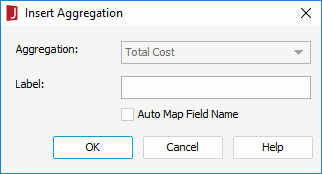
Aggregate Function
Specifies the function for the aggregation.
If the selected field has been predefined with an aggregate function, the option is Aggregation. The name of the field is displayed in the text box and cannot be edited.
Label
Specifies the label text of the new aggregation in the crosstab. You can leave it blank.
Auto Map Field Name
The option is available when inserting an aggregation into a crosstab that is created using a business view. It specifies whether to automatically map the label text to the dynamic display name of the field used for the aggregation at runtime.
OK
Inserts the aggregate field and closes the dialog.
Cancel
Does not retain any changes and closes the dialog.
Help
Displays the help document about this feature.